by Contributed | Nov 18, 2020 | Azure, Microsoft, Technology
This article is contributed. See the original author and article here.
The Symptoms
Recently I came to a support issue where we tried to use REST API to list SQL resources on an Azure subscription. The output returned results, but it did not show any of the SQL resources that we expected to see. Filtering the result with a GREP only brought up a storage account that had “SQL” in its name, but none of the servers or databases.
These are the commands that were used:
az rest -m get -u 'https://management.azure.com/subscriptions/11111111-2222-3333-4444-555555555555/resources?api-version=2020-06-01'
GET https://management.azure.com/subscriptions/11111111-2222-3333-4444-555555555555/resources?api-version=2020-06-01
The Troubleshooting
The Azure portal showed the full list of Azure SQL servers and databases, for either drilling down through the subscription or going directly to the “SQL servers” or “SQL databases” blades. Commands like az sql db list or az sql server list also returned all SQL resources. Permission issues were excluded by using an owner account for subscription and resources. And it turned out that only one specific subscription was affected, whereas it worked fine for all other subscription.
The Cause
Some list operations divide the result into separate pages when too much data is returned and the results are too large to return in one response. A typical size limit is when the list operation returns more than 1,000 items.
In this specific case, the subscription contained so many resources that the SQL resources didn’t make it onto the first result page. It required using the URL provided by the nextLink property to switch to the second page of the resultset.
The Solution
When using list operations, a best practice is to check the nextLink property on the response. When nextLink isn’t present in the results, the returned results are complete. When nextLink contains a URL, the returned results are just part of the total result set. You need to skip through the pages until you either find the resource you are looking for, or have reached the last page.
The response with a nextLink field looks like this:
{
  "value": [
    <returned-items>
  ],
  "nextLink": "https://management.azure.com:24582/subscriptions/11111111-2222-3333-4444-555555555555/resources?%24expand=createdTime%2cchangedTime%2cprovisioningState&%24skiptoken=eyJuZXh0UG...<token details>...MUJGIn0%3d"
}
This URL can be used in the “-u” parameter (or –uri/–url) of the REST client, e.g. in the az rest command.
Further Information
by Contributed | Nov 18, 2020 | Azure, Microsoft, Technology
This article is contributed. See the original author and article here.
Data format mappings (for example, Parquet, JSON, and Avro) in Azure Data Explorer now support simple and useful ingest-time transformations. In cases where the scenario requires more complex processing at ingest time, use the update policy, which will allow you to define lightweight processing using KQL expression.
In addition, as part of a 1-click experience, you now have the ability to select data transformation logic from a supported list to add to one or more columns.
To learn more, read about mapping transformations.
by Contributed | Nov 18, 2020 | Azure, Microsoft, Technology
This article is contributed. See the original author and article here.
This week, Tiberiu Radu (Azure Stack Hub PM @rctibi) and I, had the chance to speak to Azure Stack Hub Partner Cloud Assert. Cloud Assert is an Azure Stack Hub partner that helps provide value to both Enterprises and Service Providers. Their solutions cover aspects from billing and approvals all the way to multi-Azure Stack Hub stamp management. Join the Cloud Assert team as we explore the many ways their solutions provide value and help Service Providers and Enterprises in their journey with Azure Stack Hub.
They have several solutions for customers and partners like Azure Stack Hub Multi-Stamp management. Azure Stack Hub Multi-Stamp management enables you to manage and take actions across multiple stamp instances from a single Azure Stack Hub portal with one-pane of glass experience. It provides a holistic way for operators and administrators to perform many of their scenarios from a single portal without switching between various stamp portals. This is a comprehensive solution from Cloud Assert leveraging Cloud Assert VConnect and Usage and billing resource providers for Azure Stack Hub.
We created this new Azure Stack Hub Partner solution video series to show how our customers and partners use Azure Stack Hub in their Hybrid Cloud environment. In this series, as we will meet customers that are deploying Azure Stack Hub for their own internal departments, partners that run managed services on behalf of their customers, and a wide range of in-between as we look at how our various partners are using Azure Stack Hub to bring the power of the cloud on-premises.
Links mentioned through the video:
I hope this video was helpful and you enjoyed watching it. If you have any questions, feel free to leave a comment below. If you want to learn more about the Microsoft Azure Stack portfolio, check out my blog post.
by Contributed | Nov 17, 2020 | Azure, Microsoft, Technology
This article is contributed. See the original author and article here.
Final Update: Wednesday, 18 November 2020 01:36 UTC
We’ve confirmed that all systems are back to normal with no customer impact as of 11/18, 01:15 UTC. Our logs show the incident started on 11/18, 00:20 UTC and that during the 55 minutes that it took to resolve the issue some customers might have experienced issues with missed or delayed Log Search Alerts or experienced difficulties accessing data for resources hosted in West US2 and North Europe.
- Root Cause: The failure was due to an issue in one of our backend services.
- Incident Timeline: 55 minutes – 11/18, 00:20 UTC through 11/18, 01:15 UTC
We understand that customers rely on Azure Log Analytics as a critical service and apologize for any impact this incident caused.
-Saika
by Contributed | Nov 17, 2020 | Azure, Microsoft, Technology
This article is contributed. See the original author and article here.
As customers progress and mature in managing Azure Policy definitions and assignments, we have found it important to ease the management of these artifacts at scale. Azure Policy as code embodies this idea and focuses on managing the lifecycle of definitions and assignments in a repeatable and controlled manner. New integrations between GitHub and Azure Policy allow customers to better manage policy definitions and assignments using an “as code” approach.
More information on Azure Policy as Code workflows here.
Export Azure Policy Definitions and Assignments to GitHub directly from the Azure Portal
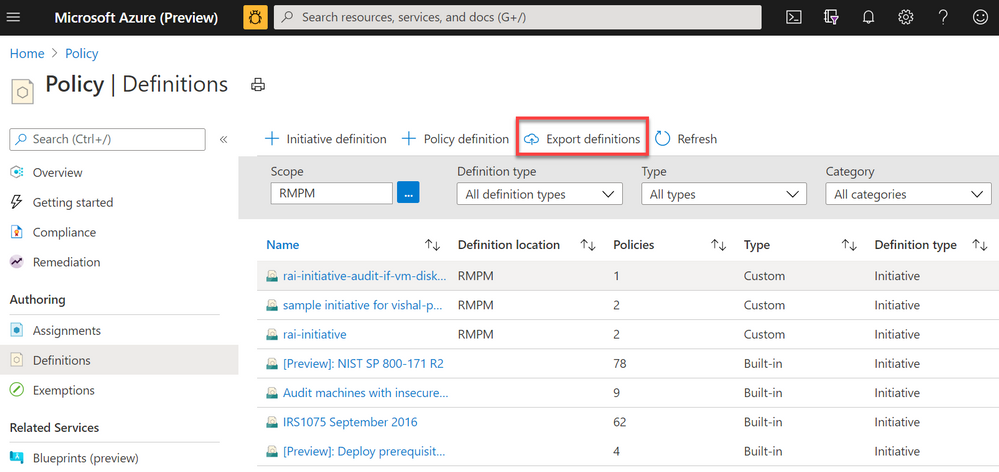
 Screenshot of Azure Policy definition view blade from the Azure Portal with a red box highlighting the Export definitions button
The Azure Policy as Code and GitHub integration begins with the export function; the ability to export policy definitions and assignments from the Azure Portal to GitHub repositories. Now available in the definitions view, the export definition button will allow you to select your GitHub repository, branch, directory then instruct you to select the policy definitions and assignments you wish to export. After exporting, the selected artifacts will be exported to the GitHub. The files will be exported in the following recommended format:
|- <root level folder>/  ________________ # Root level folder set by Directory property

| |- policies/  ________________________ # Subfolder for policy objects

|  |- <displayName>_<name>____________ # Subfolder based on policy displayName and name properties

|   |- policy.json _________________ # Policy definition

|    |- assign.<displayName>_<name>__ # Each assignment (if selected) based on displayName and name properties
Naturally, GitHub keeps tracks of changes committed in files which will help in versioning of policy definitions and assignments as conditions and business requirements change. GitHub will also help organizing all Azure Policy artifacts in a central source control for easy management and scalability.
Leverage GitHub workflows to sync changes from GitHub to Azure
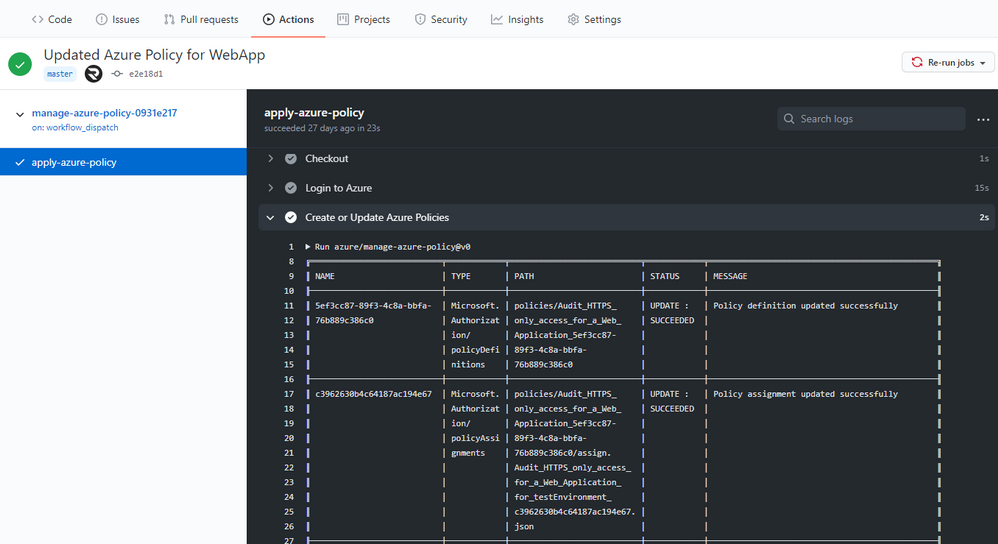 Screenshot of the Manage Azure Policy action within GitHub
An added feature of exporting is the creation of a GitHub workflow file in the repository. This workflow leverages the Manage Azure Policy action to aid in syncing changes from your source control repository to Azure. The workflow makes it quick and easy for customers to iterate on their policies and to deploy them to Azure. Since workflows are customizable, this workflow can be modified to control the deployment of those policies following safe deployment best practices.
Furthermore, the workflow will add in traceability URLs into the definition metadata for easy tracking of the GitHub workflow run that updated the policy.
More information on Manage Azure Policy GitHub Action here.
Trigger Azure Policy Compliance Scans in a GitHub workflow
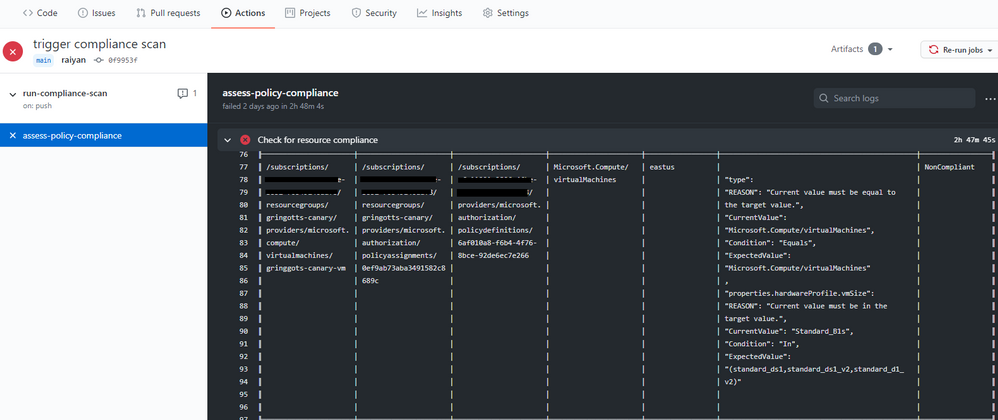 Screenshot of the Azure Policy compliance scan on GitHub Actions
We also rolled out the Azure Policy Compliance Scan that triggers an on-demand compliance evaluation scan. This can be triggered from a GitHub workflow to test and verify policy compliance during deployments. The workflow also allows for the compliance scan to be targeted at specific scopes and resources by leveraging the scopes and scopes-ignore inputs. Furthermore, the workflow is able to upload a CSV file with list of resources that are non-compliant after the scan is complete. This is great for rolling out new policies at scale and verifying the compliance of your environment is as expected.
More information on the Azure Policy Compliance Scan here.
These three integration points between GitHub and Azure Policy create a great foundation for leveraging policies in ‘as code’ approach. As always, we look forward to your valuable feedback and adding more capabilities.

by Contributed | Nov 17, 2020 | Azure, Microsoft, Technology
This article is contributed. See the original author and article here.

As Azure continues to deliver new H-series and N-series virtual machines that match the capabilities of supercomputing facilities around the world, we have at the same time made significant updates to Azure CycleCloud — the orchestration engine that enables our customers to build HPC environments using these virtual machine families.
We are pleased to announce the general availability of Cyclecloud 8.1, the first release of CycleCloud on the 8.x platform. Here are some of the new features in this release that we are excited to share with you.
Welcome Univa Grid Engine
Univa Grid Engine, the enterprise-grade version of the beloved Grid Engine scheduler, joins IBM Spectrum LSF, OpenPBS, Slurm, and HTCondor as supported schedulers in CycleCloud.
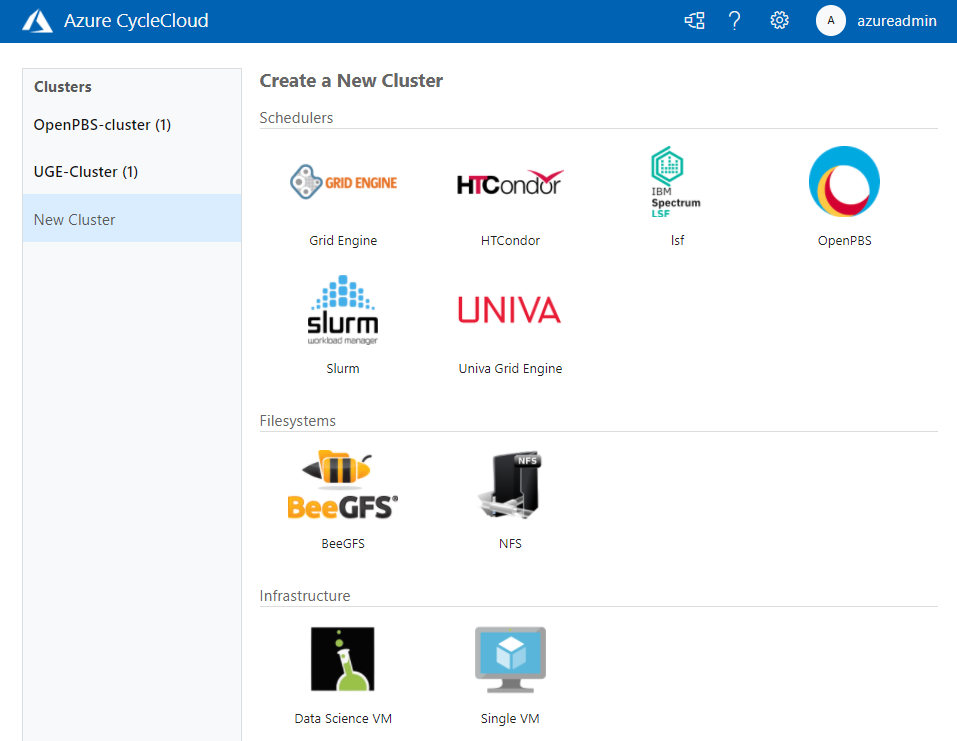
Whether they are tightly-coupled or high-throughput, submit your jobs to your scheduler of choice and CycleCloud will allocate the required compute infrastructure on Azure to meet resource demands, and automatically scale down the infrastructure after the jobs complete. With this addition, CycleCloud is the only cloud HPC orchestration engine that supports all the major HPC batch schedulers, one that you can rely upon to run your production workloads.
Configure Shared Filesystems Easily in the UI
In CycleCloud 8.1, it is simple to attach and mount network attached storage file systems to your HPC cluster. High-performance storage is a crucial component of HPC systems; Azure provides different storage services, such as HPC Cache, NetApp Files, and Azure Blob, that you may use as part of your HPC deployment, with each service optimized for different workloads.
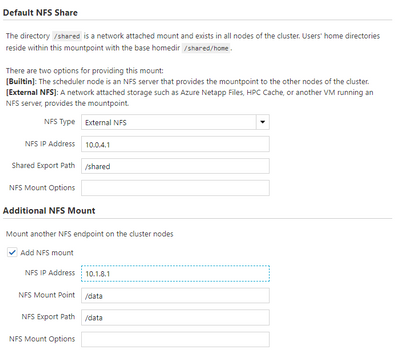
Most workloads typically require access to one or more shared filesystems for common directory or file access, and you can now configure your cluster to mount NFS shares through the CycleCloud web user interface without needing to modify configuration files.
Perform Last-Mile VM Customization with Cloud-Init
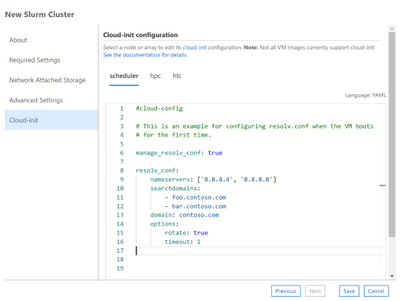
CycleCloud Projects is a powerful tooling system for customizing your cluster nodes as they boot-up. In CycleCloud 8, we have included support for a complementary approach with Cloud-Init, a widely-used initialization system for customizing virtual machines.
You can now use the CycleCloud UI or a cluster template to specify a cloud-init config, Shell script or Python script that will configure a VM to your requirements before any of CycleCloud’s preparation steps.
Trigger Actions through Azure Event Grid
CycleCloud 8 generates events when certain node or cluster changes occur, and you can configure your CycleCloud installation to have these events published to Azure Event Grid. With this, you can create triggers for events like SpotVM evictions or node allocation failures, and automatically drive downstream actions or alerts . For example, track Spot eviction rates for your clusters by VM SKU and Region, and use those to trigger a decision to switch to pay-as-you-go VMs.
Azure is the Best Place to Run HPC Workloads
Over the past year, we have been privileged in being able to help our partners run their mission critical HPC workloads on Azure. CycleCloud has been used by the U.S Navy to run weather simulations for forecasting cyclone paths and intensities, by structural biologists to obtain one of the first glimpses at the crucial SARS-Cov-2 Spike protein, by biomedical engineers in performing ventilator airflow simulations ahead of an FDA EUA submission.
With the CycleCloud 8.1 release, we look forward to continuing our support of the HPC community and partners by giving them familiar and easy access to scalable, true supercomputing infrastructure Azure.
Learn More
All the new features in Azure CycleCloud 8.1
Azure CycleCloud Documentation
Azure HPC


Recent Comments